
Study with friends online, in a cozy pixel café
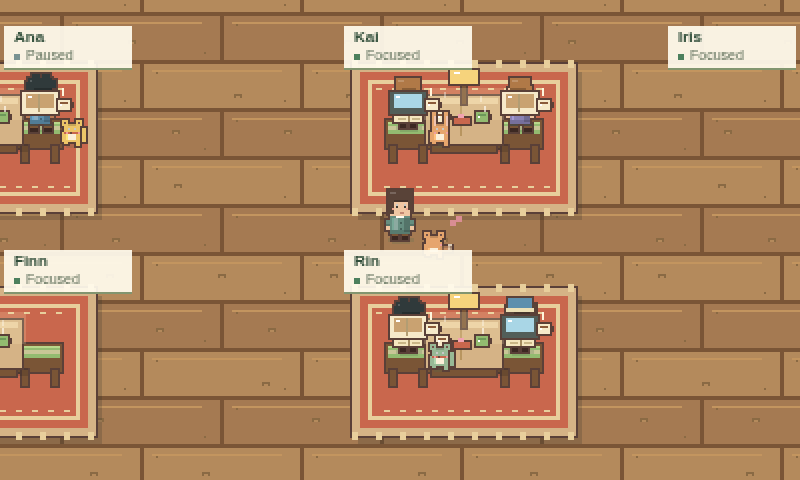
Study Grove has free shared study rooms where your character sits at a desk next to other people and you work on your own tasks. You can see who is studying, you keep your own focus timer, and nobody sees or hears you. It is a quiet, game-like take on body doubling: working alongside someone else so that it is easier to start and to keep going.
Updated
How shared rooms work
- 1
Sign in
Use your free Study Grove account, made with Google, Discord or email. Shared rooms only admit signed-in players.
- 2
Choose a room
Open the room list and pick one on purpose. Study Grove never puts you in a room automatically, and you can always study solo instead.
- 3
Take a seat
Walk to a free desk, or use Find free seat. In the café, named stairs lead between the coffee hall and the reading loft.
- 4
Focus side by side
Start your own timer. Other players see your character, your name and whether you are focused, and you see theirs.
Rooms you can join
These rooms are always open. If one of them is full, Join matching room takes you to a fresh copy of it.
| Room | What it is like | Up to |
|---|---|---|
| Fern & Bean · Two-floor Café | A coffee hall and a reading loft with 24 seats on each floor. | 32 people |
| Grand Sanctuary · Silent Study | A large hall for deep work. Chat is switched off. | 32 people |
| Clocktower Atrium · Pomodoro 25/5 | A hall for people working in 25-minute Pomodoro rounds. Everyone runs their own timer. | 32 people |
| Lo-Fi Cafe & Lounge · Co-Working | A relaxed lounge where conversation is welcome. | 16 people |
| Study Cottage · Intimate Focus | A small cottage room for a few people. | 8 people |
Make a room for your group
Use Create Room to open your own space. Give it a name of up to 40 characters, choose a layout (the Grand Sanctuary & Café, the Fern & Bean café or the cozy study cottage), pick a study mode (Pomodoro, free co-working or strict silent focus) and set how many people can join, up to 32, or 8 in the cottage.
Your room appears in the room list, so tell your friends its name and they can pick it there. The list is shared, so anyone who is signed in can take an open seat.
Body doubling without a camera
Body doubling means doing focused work while someone else is present, in person or online. The other person does not help with the task; their presence is the point. Cleveland Clinic describes it as a way to stay focused and motivated, and Understood notes that research on it is still limited, although many people, including many with ADHD, find it helpful.
Video study rooms usually rely on webcams. Study Grove uses characters at desks instead. You can see that other people are working, and there is no video, voice or microphone at all. Study Grove is a study tool, not a treatment.
Chat, quiet and safety
- Chat bubbles and emotes in rooms start hidden. Turn them on when you want them.
- There are two chat channels: Room reaches the people in your room, and All reaches everyone in town.
- Every message passes a word filter on the server. Profanity is masked, slurs and harassment are blocked, and player names are filtered too.
- Sending is rate-limited, so nobody can flood a room.
- Click a name to mute that person on your account. Blocking and your quiet settings are remembered.
- You can report a player. A report is confirmed once it is safely stored on the server.
- Silent rooms switch chat off completely.
Other players in your room see your display name, your character’s look, where you sit and whether you are studying. Choose a display name you are comfortable sharing. The privacy page has the details.
Your timer stays yours
In every room you run your own focus timer, and it earns the same 2 XP and 1 coin per completed minute as studying solo. If your connection drops, reconnecting keeps your floor and your session. Moving to another room on purpose pauses your timer, so travel time never counts as focus time.
Study room questions
Is it free to study with other people?
Yes. Every shared room is free to join, and there are no ads or paid upgrades. You only need a free account to sign in.
Do I need a webcam or microphone?
No. Study Grove has no video or voice chat. Other people see your character at a desk and whether you are focused, and that is all.
How many people fit in one room?
Up to 32 in the café and the large halls, 16 in the lounge and 8 in the cottage. The Fern & Bean café has 24 seats on each of its two floors.
Can I study with only my friends?
You can create a room with its own name and a small capacity, then have your friends pick it from the room list. Rooms are listed for every signed-in player, so a stranger could take an open seat.
What happens if I lose my connection?
Reconnect and you return to the same floor with your focus session intact. Your timer belongs to you, not to the room.