
A study game that only rewards real focus
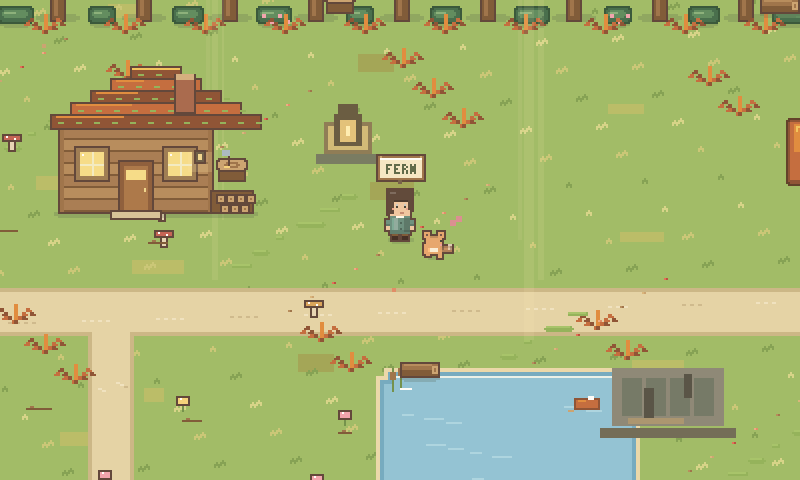
A study game turns the time you spend studying into progress in a game. Study Grove is a free one that runs in your web browser. You work with a real focus timer, a to-do list, a notebook and flashcards, and every minute you actually focus earns coins and XP for a cozy pixel-art world. Playing never counts as study time, so the game gives you a reason to start without becoming the thing that distracts you.
Updated
What makes a good study game
Plenty of apps add points to a to-do list. A study game is worth using when its rewards push you toward the work instead of away from it. These are the things to look for, and how Study Grove handles each one.
| Look for | Why it matters | In Study Grove |
|---|---|---|
| Rewards for focused time only | If idle or paused time pays, the game rewards leaving the timer running. | Each completed focus minute earns 2 XP and 1 coin. Paused minutes earn nothing. |
| Play that stops the clock | Mini-games should never quietly count as study. | Fishing, puzzles, gathering and travel pause your timer when they start. |
| Real study tools inside | Switching apps to take notes is a chance to drift. | Tasks with subjects, a notebook that saves as you type, and flashcards with a review queue. |
| A way to hide the game | Some days you only want the timer. | Fold the interface down to the world and a single Focus button. |
| No pay-to-win | Buying progress breaks the link between effort and reward. | Free, with no ads and no paid currency. Coins come only from focusing. |
How study time becomes progress
- 1
Write down the task
Name what you are working on and add a subject if you like. Finished tasks go into your study journal.
- 2
Start the timer
Pick 15, 25 or 50 minutes, or your own length. The session carries across browser tabs.
- 3
Finish the session
Every focused minute turns into coins and XP, and every 25 focus minutes add a building material.
- 4
Spend it on your world
Furnish your cottage, care for your pet, restore landmarks and open new regions to study in.
A 25-minute session earns 25 coins, 50 XP and one building material. The focus timer guide explains session lengths and breaks.
What there is to do between sessions
- Choose a character and a pet: a fox, cat, bunny, dog, slime or dragon, or paint your own pixel pet.
- Decorate a cottage with furniture, rugs and garden pieces bought with focus coins.
- Explore Fernwood town, Mosswood Forest, Sunshore Coast and Starlight Peaks.
- Fish at the pond, identify mushrooms, match shells and chart constellations.
- Watch the world change with the seasons of the real calendar, and with day and night on your local clock.
- Listen to four lofi radio stations that are generated live in your browser.
Who a study game suits
Study Grove is made for school and university students, people preparing for exams, and anyone learning on their own at a screen. It tends to suit people who like cozy games, people who find it hard to start a session without a small reward in sight, and people who focus better with others nearby, who can sit in a shared study room.
When a plain timer is the better choice
If any game on screen pulls you away from your work, a study game may not help. Try folding the interface down to the timer first. If that still distracts you, a simple timer with nothing else on screen is the better tool, and that is fine.
Study game questions
Are there games that actually help you study?
Yes, if the game rewards focused time and nothing else. In Study Grove, only completed focus minutes earn coins and XP, and every mini-game pauses the timer before it starts, so the game cannot replace the studying.
Is Study Grove a real game or just a timer?
Both. The study tools work on their own: a focus timer, tasks, a notebook and flashcards. Around them is a pixel-art world with a cottage, a pet, four regions to explore and small activities such as fishing and puzzles.
Does playing the game count as study time?
No. Fishing, puzzles, gathering and travel pause your focus timer when they start, and paused time earns nothing.
Is the study game free?
Yes. Study Grove is free, with no ads, no subscription and no paid currency. You need a free account to sign in, which also syncs your save between devices.
Do I need to download anything?
No. Study Grove runs in any modern web browser on a laptop, tablet or phone. You can also install it from your browser so it opens in its own window.