
A free lofi virtual study room in your browser
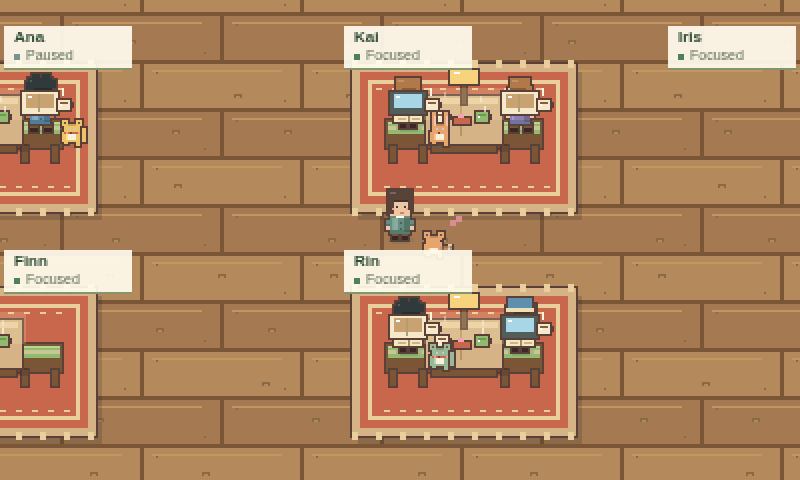
Study Grove is a free virtual study room in your browser. Your pixel character sits at a desk in a cozy café or a quiet hall beside other people who are studying, you run your own focus timer, and lofi radio plays while you work. Bring your friends; there is no camera or microphone, and nothing to download.
Updated
What is a virtual study room?
A virtual study room is an online place where people study at the same time, so that each of them has company while they work. Some are video calls with cameras on, some are recorded study-with-me videos, and some are shared worlds where characters sit at desks. Study Grove is the last kind: you see real people nearby and whether each one is focused, and nobody sees or hears you.
What music plays in the study room?
Lofi radio plays while you study: four stations, Grove beats, Rainy café, Mosswood morning and Starlight, generated live in your browser with the Web Audio API. The radio streams nothing from elsewhere, and the music keeps playing as you move between the town, the café and the peaks.
In the shared Fern & Bean café, a small jukebox also lets the people in the room line up YouTube songs and vote on what plays next. Hide it and the lofi radio comes back. The focus timer guide has more about the radio and breaks.
Can I study with friends without a camera?
Yes. Create a room with its own name, layout and size, then have your friends pick it from the room list; there is no video, voice or microphone at all. The list is shared, so anyone who is signed in could take an open seat. Study with friends lists every room and how chat and safety work, and the body doubling guide explains why working beside someone helps.
How does a session in the study room work?
- 1
Sign in
Shared rooms admit signed-in players. The account is free, made with Google, Discord or email.
- 2
Choose a room
Pick the two-floor café, a silent hall with chat switched off, a Pomodoro hall, a lounge or a small cottage room. Nothing joins you automatically.
- 3
Sit down and start your timer
Take a free desk and start a 15, 25 or 50-minute session, or a length of your own. Others see your Focused or Paused tag.
- 4
Watch your world grow
Each completed focus minute earns 2 XP and 1 coin for your cottage, your pet and new places to explore. Paused time earns nothing.
What other virtual study rooms are there?
There are several, and they suit different people. These details come from each one’s own website, as checked for our comparison of study apps on October 19, 2026.
- lofi.town: a cozy pixel town in the browser for studying and hanging out with friends, with lofi radio and Pomodoro timers. Free core features, with optional supporter tiers.
- Focusmate: booked one-to-one co-working sessions of 25, 50 or 75 minutes on a video call. Free for 3 sessions a week.
- Focumon: a gamified focus timer in the browser where you collect and train creatures, with focus parties of up to six.
- Study-with-me videos and streams: you work along with a recorded or live video of someone studying.
Choose Study Grove if you want company without a camera, a notebook and flashcards next to the timer, and rewards that come only from focused minutes. The full comparison sets out price, camera and platform side by side.
Virtual study room questions
Is Study Grove free?
Yes. Study Grove is free, with no ads, no subscription and no paid currency. You can play on your own without an account; a free account is needed for the shared rooms and chat.
Do I need a webcam or microphone?
No. Study Grove has no video or voice chat. Other people see your character at a desk and whether you are focused, and that is all.
How many people fit in one room?
Up to 32 in the café and the large halls, 16 in the lounge and 8 in the cottage. The Fern & Bean café has 24 seats on each of its two floors.
Do I have to talk to anyone?
No. Chat bubbles in rooms start hidden, the silent study hall has chat switched off, and you can always study solo instead.
Does it work on a phone?
Yes. Study Grove runs in any modern web browser on a laptop, tablet or phone, with nothing to download. You can also install it from the browser as an app.